Showing posts with label nio. Show all posts

Thursday, November 5, 2015

Java I/O, NIO and NIO.2


Java I/O, NIO and NIO.2

Java I/O, NIO, and NIO.2 is a power-packed book that accelerates your mastery of Java's various I/O APIs. In this book, you'll learn about classic I/O APIs (File, RandomAccessFile, the stream classes and related types, and the reader/writer classes). Next, you'll learn about NIO's buffer, channel, selector, regular expression, charset, and formatter APIs. Finally, you'll discover NIO.2's offerings in terms of an improved file system interface, asynchronous I/O, and the completion of socket channel functionality.

After reading and using thi book, you'll gain the accelerated knowledge and skill level to really build applications with efficient data access, especially for today's cloud computing streaming data needs.

What you’ll learn
  • How to set permissions and more with the classic File class
  • How to build a flat file database with RandomAccessFile
  • Get to know the byte array, file, filter, and other kinds of streams
  • Master serialization and externalization
  • Discover character streams and their associated writers/readers
  • Tour the buffer APIs
  • Work with channels to transfer buffers to and from I/O services
  • Find out about selectors and readiness selection
  • Master regular expressions
  • Discover charsets and their association with Java's String< class
  • Take advantage of the formatter API to create formatted output
  • How to customize the formatter API
  • Explore the improved file system interface
  • Discover asynchronous I/O and its association with futures and completion handlers
  • Encounter socket channel improvements, including multicasting
Who this book is for
This book is for those experienced with Java, beyond the fundamentals.

Table of Contents
Part 1: Getting Started with I/O
Chapter 1: I/O Basics and APIs
Part 2: Classic I/O APIs
Chapter 2: File
Chapter 3: RandomAccessFile
Chapter 4: Streams
Chapter 5: Writers and Readers
Part 3: New I/O APIs
Chapter 6: Buffers
Chapter 7: Channels
Chapter 8: Selectors
Chapter 9: Regular Expressions
Chapter 10: Charsets
Chapter 11: Formatter and Scanner
Part 4: More New I/O APIs
Chapter 12: File System APIs
Chapter 13: Asynchronous I/O
Chapter 14: Additional NIO.2 APIs
Appendix A: Answers to Review Exercises

Tuesday, September 3, 2013

SimpleFileVisitor example

java.nio.file.SimpleFileVisitor is a simple visitor of files with default behavior to visit all files and to re-throw I/O errors.

Simple example using SimpleFileVisitor.
package java_simplefilevisitor;

import java.io.IOException;
import java.nio.file.FileVisitResult;
import java.nio.file.Files;
import java.nio.file.Path;
import java.nio.file.Paths;
import java.nio.file.SimpleFileVisitor;
import java.nio.file.attribute.BasicFileAttributes;
import java.util.logging.Level;
import java.util.logging.Logger;

/**
 *
 * @web http://java-buddy.blogspot.com/
 */
public class Java_SimpleFileVisitor {
    
    public static class MySimpleFileVisitor extends SimpleFileVisitor<Path> {

        @Override
        public FileVisitResult preVisitDirectory(Path dir, BasicFileAttributes attrs) 
                throws IOException {
            System.out.format("preVisitDirectory: %s\n", dir);
            return super.preVisitDirectory(dir, attrs);
        }

        @Override
        public FileVisitResult visitFile(Path file, BasicFileAttributes attrs) 
                throws IOException {
            System.out.format("visitFile: %s\n", file);
            return super.visitFile(file, attrs);
        }

        @Override
        public FileVisitResult visitFileFailed(Path file, IOException exc) 
                throws IOException {
            System.out.format("visitFileFailed: %s\n", file);
            return super.visitFileFailed(file, exc);
        }

        @Override
        public FileVisitResult postVisitDirectory(Path dir, IOException exc) 
                throws IOException {
            System.out.format("postVisitDirectory: %s\n", dir);
            return super.postVisitDirectory(dir, exc);
        }
        
    }

    public static void main(String[] args) {
        Path path = Paths.get("/home/eric/NetBeansProjects/Java_SimpleFileVisitor");
        MySimpleFileVisitor mySimpleFileVisitor = new MySimpleFileVisitor();
        
        try {
            Files.walkFileTree(path, mySimpleFileVisitor);
        } catch (IOException ex) {
            Logger.getLogger(Java_SimpleFileVisitor.class.getName()).log(Level.SEVERE, null, ex);
        }
    }
}


SimpleFileVisitor
SimpleFileVisitor example


Reference:
- Class SimpleFileVisitor
- Walking the File Tree


Thursday, February 7, 2013

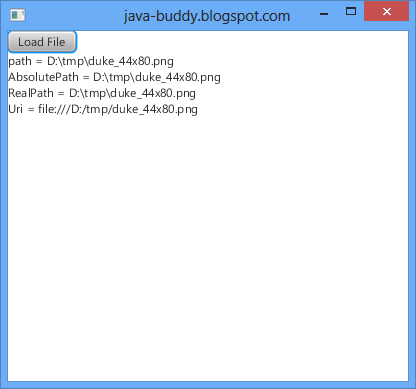
AbsolutePath, RealPath and Uri

AbsolutePath, RealPath and Uri


package javafx_niofile;

import java.io.File;
import java.io.IOException;
import java.nio.file.LinkOption;
import java.nio.file.Path;
import java.util.logging.Level;
import java.util.logging.Logger;
import javafx.application.Application;
import javafx.event.ActionEvent;
import javafx.event.EventHandler;
import javafx.scene.Scene;
import javafx.scene.control.Button;
import javafx.scene.control.Label;
import javafx.scene.layout.VBox;
import javafx.stage.FileChooser;
import javafx.stage.Stage;

/**
 *
 * @web http://java-buddy.blogspot.com/
 */
public class JavaFX_NIOFile extends Application {
    
    Label label;
    
    @Override
    public void start(Stage primaryStage) {
        Button btnLoad = new Button();
        btnLoad.setText("Load File");
        btnLoad.setOnAction(btnLoadEventListener);
        
        label = new Label();
        
        VBox rootBox = new VBox();
        rootBox.getChildren().addAll(btnLoad, label);
        
        Scene scene = new Scene(rootBox, 400, 350);
        primaryStage.setTitle("java-buddy.blogspot.com");
        primaryStage.setScene(scene);
        primaryStage.show();
    }

    public static void main(String[] args) {
        launch(args);
    }
    
    EventHandler<ActionEvent> btnLoadEventListener
    = new EventHandler<ActionEvent>(){
  
        @Override
        public void handle(ActionEvent t) {
            FileChooser fileChooser = new FileChooser();
              
            //Set extension filter
            FileChooser.ExtensionFilter extFilter 
                    = new FileChooser.ExtensionFilter("ALL files (*.*)", "*.*");
            fileChooser.getExtensionFilters().add(extFilter);
               
            //Show open file dialog, return a java.io.File object
            File file = fileChooser.showOpenDialog(null);
            
            //obtain a java.nio.file.Path object 
            Path path = file.toPath();
            
            String fileInfo;
            fileInfo = "path = " + path + "\n";
            try {
                fileInfo +=
                 "AbsolutePath = " + path.toAbsolutePath() + "\n" +
                 "RealPath = " + path.toRealPath(LinkOption.NOFOLLOW_LINKS) + "\n" +
                 "Uri = " + path.toUri() + "\n";
            } catch (IOException ex) {
                Logger.getLogger(JavaFX_NIOFile.class.getName()).log(Level.SEVERE, null, ex);
            }

            label.setText(fileInfo);
        }
    };
}


Wednesday, February 6, 2013

Resolve path

This example demonstrate how to use the method Path java.nio.file.Path.resolve(Path other) to resolve the given path against this path.

package javafx_niofile;

import java.io.File;
import java.nio.file.Path;
import javafx.application.Application;
import javafx.event.ActionEvent;
import javafx.event.EventHandler;
import javafx.scene.Scene;
import javafx.scene.control.Button;
import javafx.scene.control.Label;
import javafx.scene.layout.VBox;
import javafx.stage.FileChooser;
import javafx.stage.Stage;

/**
 *
 * @web http://java-buddy.blogspot.com/
 */
public class JavaFX_NIOFile extends Application {
    
    Label label;
    
    @Override
    public void start(Stage primaryStage) {
        Button btnLoad = new Button();
        btnLoad.setText("Load File");
        btnLoad.setOnAction(btnLoadEventListener);
        
        label = new Label();
        
        VBox rootBox = new VBox();
        rootBox.getChildren().addAll(btnLoad, label);
        
        Scene scene = new Scene(rootBox, 400, 350);
        primaryStage.setTitle("java-buddy.blogspot.com");
        primaryStage.setScene(scene);
        primaryStage.show();
    }

    public static void main(String[] args) {
        launch(args);
    }
    
    EventHandler<ActionEvent> btnLoadEventListener
    = new EventHandler<ActionEvent>(){
  
        @Override
        public void handle(ActionEvent t) {
            FileChooser fileChooser = new FileChooser();
              
            //Set extension filter
            FileChooser.ExtensionFilter extFilter 
                    = new FileChooser.ExtensionFilter("ALL files (*.*)", "*.*");
            fileChooser.getExtensionFilters().add(extFilter);
               
            //Show open file dialog, return a java.io.File object
            File file = fileChooser.showOpenDialog(null);
            
            //obtain a java.nio.file.Path object 
            Path path = file.toPath();
            
            Path parentPath = path.getParent();
            Path partialPath = path.getFileName();
            Path resolvedPath = parentPath.resolve(partialPath);
            
            String fileInfo = "parent = " + parentPath + "\n" +
                    "partial path = " + partialPath + "\n" +
                    "resolve Path = " + resolvedPath;

            label.setText(fileInfo);
        }
    };
}


Resolve path
Resolve path


Sunday, February 3, 2013

Access subpath of java.nio.file.Path

Access subpath of java.nio.file.Path


package javafx_niofile;

import java.io.File;
import java.nio.file.Path;
import javafx.application.Application;
import javafx.event.ActionEvent;
import javafx.event.EventHandler;
import javafx.scene.Scene;
import javafx.scene.control.Button;
import javafx.scene.control.Label;
import javafx.scene.layout.VBox;
import javafx.stage.FileChooser;
import javafx.stage.Stage;

/**
 *
 * @web http://java-buddy.blogspot.com/
 */
public class JavaFX_NIOFile extends Application {
    
    Label label;
    
    @Override
    public void start(Stage primaryStage) {
        Button btnLoad = new Button();
        btnLoad.setText("Load File");
        btnLoad.setOnAction(btnLoadEventListener);
        
        label = new Label();
        
        VBox rootBox = new VBox();
        rootBox.getChildren().addAll(btnLoad, label);
        
        Scene scene = new Scene(rootBox, 400, 350);
        primaryStage.setTitle("java-buddy.blogspot.com");
        primaryStage.setScene(scene);
        primaryStage.show();
    }

    public static void main(String[] args) {
        launch(args);
    }
    
    EventHandler<ActionEvent> btnLoadEventListener
    = new EventHandler<ActionEvent>(){
  
        @Override
        public void handle(ActionEvent t) {
            FileChooser fileChooser = new FileChooser();
              
            //Set extension filter
            FileChooser.ExtensionFilter extFilter 
                    = new FileChooser.ExtensionFilter("ALL files (*.*)", "*.*");
            fileChooser.getExtensionFilters().add(extFilter);
               
            //Show open file dialog, return a java.io.File object
            File file = fileChooser.showOpenDialog(null);
            
            //obtain a java.nio.file.Path object 
            Path path = file.toPath();

            String fileInfo = "path = " + path + "\n";
            fileInfo += "path.toString() = " + path.toString() + "\n";
            fileInfo += "URI: " + path.toUri() + "\n\n";

            fileInfo += "subPath: \n";
            for (Path subPath : path) {
                fileInfo += subPath + "\n";
            }

            label.setText(fileInfo);
        }
    };
}


Related:
- Get file info using java.nio.file.Path and java.nio.file.Files

Saturday, January 26, 2013

Get file info using java.nio.file.Path and java.nio.file.Files

The previous post describe how to "Get file info using java.io.File", this one have similar function using java.nio.file.Path and java.nio.file.Files.

Please note that JavaFX FileChooser return a java.io.File object. To obtain coresponding java.nio.file.Path object, call its toPath() method.

package javafx_niofile;

import java.io.File;
import java.io.IOException;
import java.nio.file.Files;
import java.nio.file.LinkOption;
import java.nio.file.Path;
import java.util.logging.Level;
import java.util.logging.Logger;
import javafx.application.Application;
import javafx.event.ActionEvent;
import javafx.event.EventHandler;
import javafx.scene.Scene;
import javafx.scene.control.Button;
import javafx.scene.control.Label;
import javafx.scene.layout.VBox;
import javafx.stage.FileChooser;
import javafx.stage.Stage;

/**
 *
 * @web http://java-buddy.blogspot.com/
 */
public class JavaFX_NIOFile extends Application {
    
    Label label;
    
    @Override
    public void start(Stage primaryStage) {
        Button btnLoad = new Button();
        btnLoad.setText("Load File");
        btnLoad.setOnAction(btnLoadEventListener);
        
        label = new Label();
        
        VBox rootBox = new VBox();
        rootBox.getChildren().addAll(btnLoad, label);
        
        Scene scene = new Scene(rootBox, 400, 350);
        primaryStage.setTitle("java-buddy.blogspot.com");
        primaryStage.setScene(scene);
        primaryStage.show();
    }

    public static void main(String[] args) {
        launch(args);
    }
    
    EventHandler<ActionEvent> btnLoadEventListener
    = new EventHandler<ActionEvent>(){
  
        @Override
        public void handle(ActionEvent t) {
            FileChooser fileChooser = new FileChooser();
              
            //Set extension filter
            FileChooser.ExtensionFilter extFilter 
                    = new FileChooser.ExtensionFilter("ALL files (*.*)", "*.*");
            fileChooser.getExtensionFilters().add(extFilter);
               
            //Show open file dialog, return a java.io.File object
            File file = fileChooser.showOpenDialog(null);
            
            //obtain a java.nio.file.Path object 
            Path path = file.toPath();
            
            String fileInfo = "Path = " + path.toString() + "\n\n";
            
            fileInfo += "FileSystem: " + path.getFileSystem() + "\n\n";
            
            fileInfo += "FileName = " + path.getFileName() + "\n"
                    + "Parent = " + path.getParent() + "\n\n"
                    + "isExecutable(): " + Files.isExecutable(path) + "\n"
                    + "isReadable(): " + Files.isReadable(path) + "\n"
                    + "isWritable(): " + Files.isWritable(path) + "\n";
            try {
                fileInfo += "getLastModifiedTime(): " + Files.getLastModifiedTime(path, LinkOption.NOFOLLOW_LINKS) + "\n"
                        + "size(): " + Files.size(path) + "\n";
            } catch (IOException ex) {
                Logger.getLogger(JavaFX_NIOFile.class.getName()).log(Level.SEVERE, null, ex);
            }

            label.setText(fileInfo);

        }
    };
    
}

Get file info using java.nio.file.Path and java.nio.file.Files


Related:
- Access subpath of java.nio.file.Path